Hello World From the Command Line
C++, Windows, Console
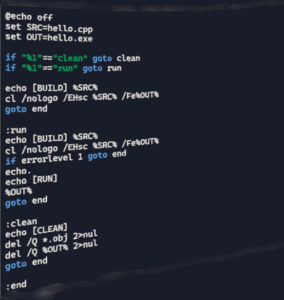
You can write C++ in Notepad, and compile/run it entirely from the Windows command line, using the Visual Studio Build Tools that come with Visual Studio 2026.
The workflow is simple once you know the exact commands.
✔️ Minimal, reproducible workflow (Notepad → CMD → Build → Run)
1) Create a folder for your project
Open Command Prompt and run:
mkdir C:\Users\<MyName>\source\repos\CppTest
cd C:\Users\<MyName>\source\repos\CppTest
2) Create the source file in Notepad
Run:
notepad hello.cpp
Paste this minimal program:
#include <iostream>
using namespace std;

int main() {
    cout << "Hello world\n";
    return 0;
}
Save → Close Notepad.
✔️ Prepare the Visual Studio compiler environment
Visual Studio’s compiler (cl.exe) is not available in a normal CMD window.
You must load the environment variables.
Option A — Start the correct console
Open:
Start Menu → “Developer Command Prompt for VS 2026”
Then:
cd C:\Users\<MyName>\source\repos\CppTest
Option B — From normal CMD (manual activation)
If you insist on staying in your current CMD window, run:
"C:\Program Files\Microsoft Visual Studio\2026\Community\VC\Auxiliary\Build\vcvars64.bat"
(Path may differ if you installed Enterprise/Professional or changed the location.)
This loads the compiler, linker, and include paths.
✔️ Compile the program
Inside the environment-enabled console:
cl hello.cpp
If everything is correct, you will see output like:
Microsoft (R) C/C++ Optimizing Compiler...
hello.cpp
Microsoft (R) Incremental Linker...
hello.exe
This produces:
hello.objhello.exe
✔️ Run the program
hello
Output:
Hello world
✔️ What each step actually does (useful for future projects)
- Notepad: plain text editor, no encoding issues, perfect for minimal C++.
- vcvars64.bat: sets PATH, INCLUDE, LIB so
cl.execan find headers and libraries. - cl hello.cpp: compiles and links automatically (single-file shortcut).
- hello.exe: final binary.
✔️ Optional improvements you may want later
- Use
/EHscfor standard C++ exceptions:cl /EHsc hello.cpp - Use
/std:c++20or/std:c++latest:cl /std:c++20 hello.cpp - Use
/Feto name the output:cl hello.cpp /FeMyProgram.exe